Marker.io vs BugHerd: Bug Reports or Page Comments? [2026]
Marker.io and BugHerd are built on opposite models: screenshot bug reporting vs comments pinned on the live page. How to pick, with real pricing.

The hands-on observations and screenshots below come from our original evaluation. This update corrects product facts and cited documentation; it does not represent a new product test.
TL;DR#
These are the two biggest brands in website feedback, and they sit on opposite sides of the category's core divide. Marker.io turns every piece of feedback into a developer-grade ticket: screenshots and browser context sent to an issue tracker, with console logs and network requests on eligible plans. BugHerd keeps feedback as a visual conversation: comments pinned to elements on the live page, automatic screenshots, and a kanban board. Pick Marker.io for in-house dev teams triaging bug reports at scale, BugHerd for design and QA review rounds where seeing feedback on the page matters. For agency client work, test reporter and guest permissions separately: Marker.io supports account-free reporting, while collaboration access depends on the role.
The two biggest names, the two opposite models#
Search for website feedback tools and these two brands come up first. That makes the comparison feel like a coin flip between near-identical products, and it is anything but. Marker.io and BugHerd made opposite bets on what feedback is.
Marker.io bet that feedback is a bug report. Its whole product exists to make tickets that developers want to receive, captured from the site and delivered into the tracker. BugHerd bet that feedback is a conversation about a page. Its whole product exists to anchor that conversation to the exact button, headline, or image it is about.
We tested and paid for both while writing our 13 best website feedback tools guide, and we build a competing product, Simple Commenter, so read this with that disclosure in mind. The screenshots and hands-on observations come from our original evaluation. We rechecked Marker.io’s public pricing and role documentation for this update; we have not rerun the product tests.
Marker.io review#
Built for: SaaS teams · In-house product teams · QA teams
Best for: Product teams and SaaS companies running internal QA who need deep debugging data.
Marker.io installs via a script snippet, Chrome extension, npm package, or CMS plugins for WordPress, Drupal, Webflow, and Shopify. Onboarding is one of the best we tested, and it asks for your integrations up front, which tells you exactly what this product is: not a replacement for your project management tool, but the middle-man between your website and that tool.
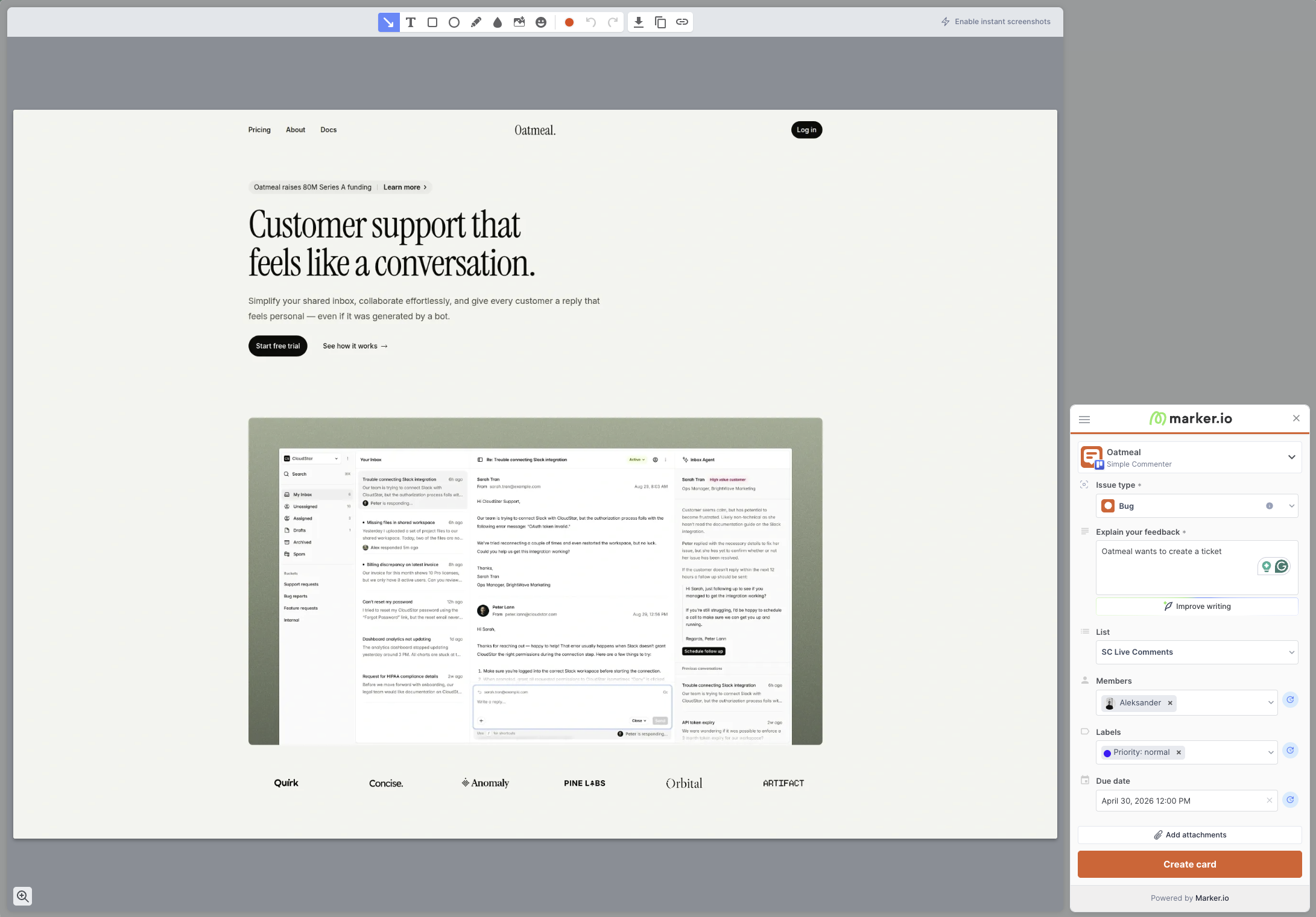
Understand the interaction model before you buy, because it surprises people. Marker.io is not a "comment on a website" tool. There are no pins on the page and no conversation threads anchored to a button. You open the widget, capture a screenshot, fill out what is essentially a ticket form, and it lands in your tracker. That is the whole flow.
What makes that flow powerful is everything attached to it. With the relevant developer tools enabled, a report can include console logs, network requests, and browser details. When a non-technical marketer says "this page is broken," your developer receives the failed API call, the JavaScript error, and the exact environment in one ticket. That context is useful when reproducing a functional bug, so check which capture tools the selected plan includes. It shows in the customer list: case studies lean on brands like L'Oréal, with one central dev team supporting hundreds of pages across markets.
Marker.io supports different reviewer roles. Its role documentation allows account-free reports through an open widget. Reporters can follow up on their own reports; shared dashboard access and visibility of other reports depend on guest or team permissions. Agencies should compare the dedicated Agency offer with their required projects and collaborators.
Key features:
- Screenshots and environment details; console logs, network requests, and replay on eligible plans
- Two-way integrations with Jira, Linear, Asana, Trello, ClickUp, Monday, and more
- Script, Chrome extension, npm, and CMS plugin installation
- Session replay on Team and above
- Enterprise security: SSO SAML, audit logs, sensitive data masking, SOC 2 Type 2
Pricing:
- Starter $39/month billed annually or $59 monthly: 3 users and up to 10 projects
- Team $149/month billed annually or $199 monthly: 15 users and up to 50 projects, with issue sync, session replay, and developer tools
- Business: custom pricing and allowances
- Agency: eligible agencies can apply for $129 monthly or $99/month billed annually, with 15 members, 50 projects, and 50 guests
- 15-day free trial, no credit card required
Source: Marker.io pricing, checked October 8, 2026. Confirm the plan, billing period, and reviewer permissions before comparing costs.
Pros:
- Developer context and tracker integrations for reproducing bug reports on eligible plans
- Integrations-first design that respects your existing PM tool
- Install plugins for almost every major CMS
- Serious enterprise features and compliance posture
- Excellent onboarding
Cons:
- Account-free reporters cannot use the shared dashboard or view other reporters’ feedback
- No pins on the page: every report is a new ticket, not a conversation
- Reviewers cannot see existing tickets, so duplicate reports pile up
- No asset feedback (images, PDFs, videos)
- Per-seat pricing gets expensive for multi-client setups
- Branding customization limited to button and widget color
Reviews:
G2 reviewers consistently praise the quality of the captured debugging data and how easily non-technical stakeholders file bugs developers can act on. The recurring criticism is fit: smaller teams and agencies say it feels like overkill, and several reviews flag the duplicate-report problem caused by no on-page ticket visibility. For a global brand with hundreds of sites, that trade is worth it. For a team of three reviewing a landing page, it is friction. More on who should switch in our Marker.io alternatives breakdown.
BugHerd review#
Built for: QA teams · In-house product teams
Best for: Teams that want a kanban-style feedback board with automatic screenshots and comments visible on the page itself.
BugHerd installs via script snippet, Chrome extension, or WordPress plugin, and onboarding is smooth: open a project from the app and you are automatically logged into the widget with no separate step.
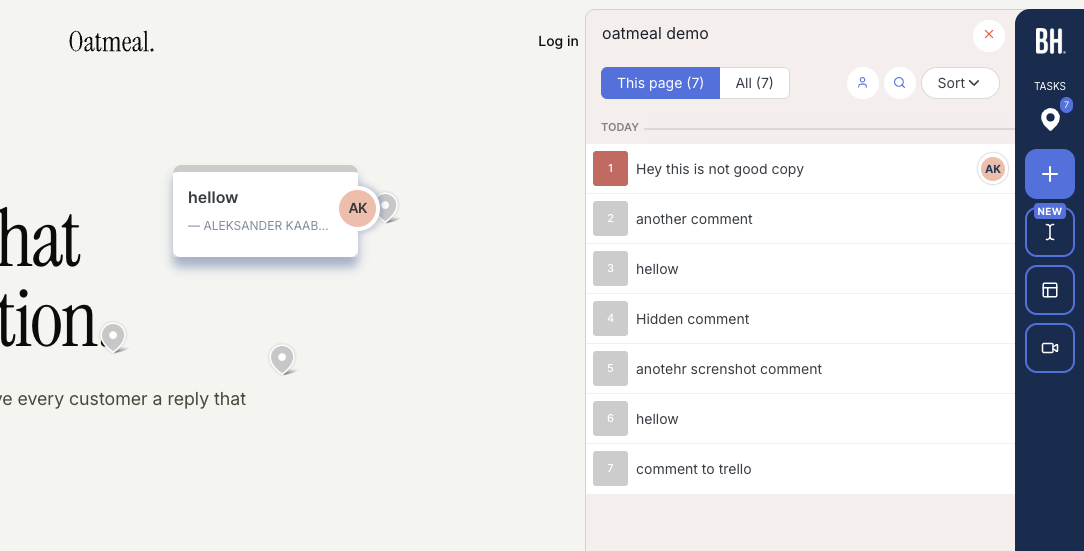
Where Marker.io files tickets, BugHerd pins conversations. A reviewer clicks the element they are commenting on, the comment sticks there, and an automatic screenshot plus browser, screen size, and OS metadata is attached. Every other reviewer visiting the page sees the existing pins, which is precisely what kills the duplicate-report problem Marker.io suffers from. On the team side, comments double as tasks on a kanban board with assignment, and two-way syncs for Jira, Asana, Linear, ClickUp, and Monday arrive on Premium and above.
BugHerd's screenshot capture deserves specific credit. Automatic screenshots cannot be done natively in the browser, and BugHerd handles even hard cases correctly: leave a comment inside an open dropdown and the capture shows the dropdown open. Its technical capture is lighter than Marker.io's, though. You get environment metadata, not console logs and network requests, so a developer chasing a JavaScript error still has to reproduce it themselves.
The limitation to know: BugHerd's "public feedback" option is for anonymous visitors only. Clients and internal reviewers must log in through BugHerd's hub before they can leave named feedback, so you cannot just send a staging link and have a stakeholder start commenting. The widget also stays heavily BugHerd-branded until the $150/mo Premium tier. Pricing is per-seat: Standard $50/mo for 5 members ($8 each additional), Studio $80/mo for 10 with video feedback, Premium $150/mo for 25, Deluxe $250/mo for 50. If the seat math is what brought you here, we keep a full list of BugHerd alternatives.
Key features:
- Comments pinned on the live page, visible to all reviewers in real time
- Automatic screenshot and technical metadata on every comment
- Kanban feedback board with task assignment
- Two-way integrations (Jira, Asana, Linear, ClickUp, Monday) on Premium and above
- Script, Chrome extension, and WordPress plugin installation
Pricing:
- Standard $50/mo (5 members, $8 per additional)
- Studio $80/mo (10 members, adds video feedback)
- Premium $150/mo (25 members, premium integrations, custom branding)
- Deluxe $250/mo (50 members, 150 GB storage)
Pros:
- On-page pins prevent duplicate reports, the exact weakness of ticket-queue tools
- Automatic screenshots that handle dropdowns and dynamic states correctly
- Kanban board your team will actually use
- Strong two-way PM integrations
- Quick, friction-light onboarding for the team side
Cons:
- Named reviewers must log in through BugHerd's hub first
- No console log or network capture, so developers get less to work with than Marker.io provides
- Heavily branded widget below Premium
- Per-seat pricing compounds past 10 members
Reviews:
BugHerd holds 4.7/5 across 179 G2 reviews. The automatic screenshots, technical details, and kanban board are the consistently named standouts, and ease of use is the recurring theme. The criticisms match our testing: per-seat pricing grows expensive, and clients need a little guidance at first because of the hub login.
Marker.io or BugHerd: how to decide#
Follow the feedback's destination. If every report should become a ticket in Jira or Linear with debugging context attached, Marker.io is built exactly for that and BugHerd will feel shallow. If feedback should live as a visible conversation on the page until it is resolved, BugHerd is built for that and Marker.io simply does not do it.
Follow the reviewer. Try the actual client task with a reporter or guest role. Account-free reporting does not automatically grant access to other reports or a shared dashboard. Check how the client finds replies and verifies a fix.
Follow the money. Marker.io Starter is $39/month with annual billing or $59 monthly; Team is $149 or $199 respectively. Compare the same billing period and required users, projects, guests, and integrations with BugHerd’s current quote. Eligible agencies should also check Marker.io’s separate Agency offer.
3 alternatives worth shortlisting#
If the report format, collaboration permissions, or pricing do not fit your reviewers, test these alternatives with the same task. The full field is in our 13 best website feedback tools guide.
1. Simple Commenter#
Best for: Teams that want clients to discuss feedback on the live page and organize the resulting work.
Clients can leave feedback without creating an account, while the team manages comments, replies, statuses, and boards. An optional client portal adds an ongoing review workspace. For a site behind authentication, reviewers still need access to the site itself.
The WordPress plugin lets the team manage feedback inside WP admin. Integrations connect the review workflow to existing tools, and the AI and MCP connection lets an agent read feedback and prepare a handoff. A coding agent needs repository access to propose a fix; review and test its changes before publishing.
See current plans and prices for the selected currency and billing period. Pro has included team seats with paid extras; Agency includes unlimited team members and white-label features. Clients do not need paid seats. SAML SSO is an optional paid Agency add-on or part of a tailored Enterprise agreement. A 14-day trial is available without a credit card.

2. Ybug#
Best for: Marker.io-style debugging data on a small-team budget, hosted in the EU.
If Marker.io's capture depth is what you want but the pricing is not, Ybug covers a surprising amount of the same ground: annotated screenshots, console logs, environment metadata, and 25+ integrations, from €10/mo. Comments live on captured screenshots rather than the live page, and integrations are push-only with no two-way sync, so it stays firmly in the ticket-queue category. EU hosting with a GDPR-ready DPA on every plan is the differentiator European compliance teams will care about.
3. Feedbucket#
Best for: The BugHerd-style pin experience, piped into your PM tool, with no reviewer signup.
Feedbucket lands between the two models: reviewers comment on the live page without signing up, every comment gets an automatic screenshot pinned exactly where it was placed, and the whole package flows into pretty much any PM tool you run. The native dashboard is deliberately thin (filters by tag and page, no kanban), because Feedbucket expects your board to be Jira or Trello. Pro is $39/mo for 5 team members with unlimited reporters, developed in the EU, 14-day trial without a card.
Final verdict#
Marker.io vs BugHerd is really tickets vs conversations. Marker.io is the best-in-category way to turn website feedback into developer-ready bug reports; BugHerd is the best-known way to keep feedback visible on the page it is about. Choose by which artifact your team actually works from. And if your reviewers are clients who will not log into either, that is the third category this comparison quietly points at, and the one Simple Commenter was built for.
Found this useful? Add us as a preferred source and Google will show you more of our guides in Search and AI Overviews.